


ProEasy Service
  • Home
  • About Us
  • Our Services New
  • Our Package
  • Support
Login

Cookies Consent

This website use cookies to help you have a superior and more relevant browsing experience on the website. Read more...

ProEasy Service
  • Home
  • About Us
  • Our Services
  • Our Package
  • Support

Preferences

  • Call Us +91 9337075353
  • Email Us contact@proeasy.co.in

Follow Us

Login
shape
shape
shape

Blog Details

Home Blog Details
image
  • By Dillip Kumar
  • 20 Nov, 2026
  • Digital Signature (DSC)
  • 5 min read

Class 3 DSC Explained: Signing vs Signing + Encryption, and How to Use It for E-Tenders

Learn the types of Class 3 DSC, the difference between signing and signing + encryption, how to bid in e-tenders with a DSC, and how to renew it on time.

Class 3 DSC Explained: Types, Uses, E-Tenders & Renewal

“Which DSC should I buy for my tender?”

This is a very common question, and a wrong choice can mean a rejected bid and wasted money. This guide explains everything in simple words.

What is a DSC?

A Digital Signature Certificate (DSC) is the electronic version of your handwritten signature. It proves who you are and that the document has not been changed after signing. It is issued by a licensed Certifying Authority approved by the Controller of Certifying Authorities (CCA), and it is legally valid under the IT Act, 2000.

Which class do you need? Only Class 3

Older DSC classes (Class 1 and Class 2) are no longer issued. Class 2 stopped on 1 January 2021, and Class 3 is now the standard for business and government use. If anyone offers you a “Class 2 DSC” today, be careful.

Types of Class 3 DSC

DSCs are also issued for an Individual or an Organisation. An organisation DSC carries the company name along with the person’s name.

Note: You cannot buy an encryption certificate on its own. It is issued together with a signing certificate.

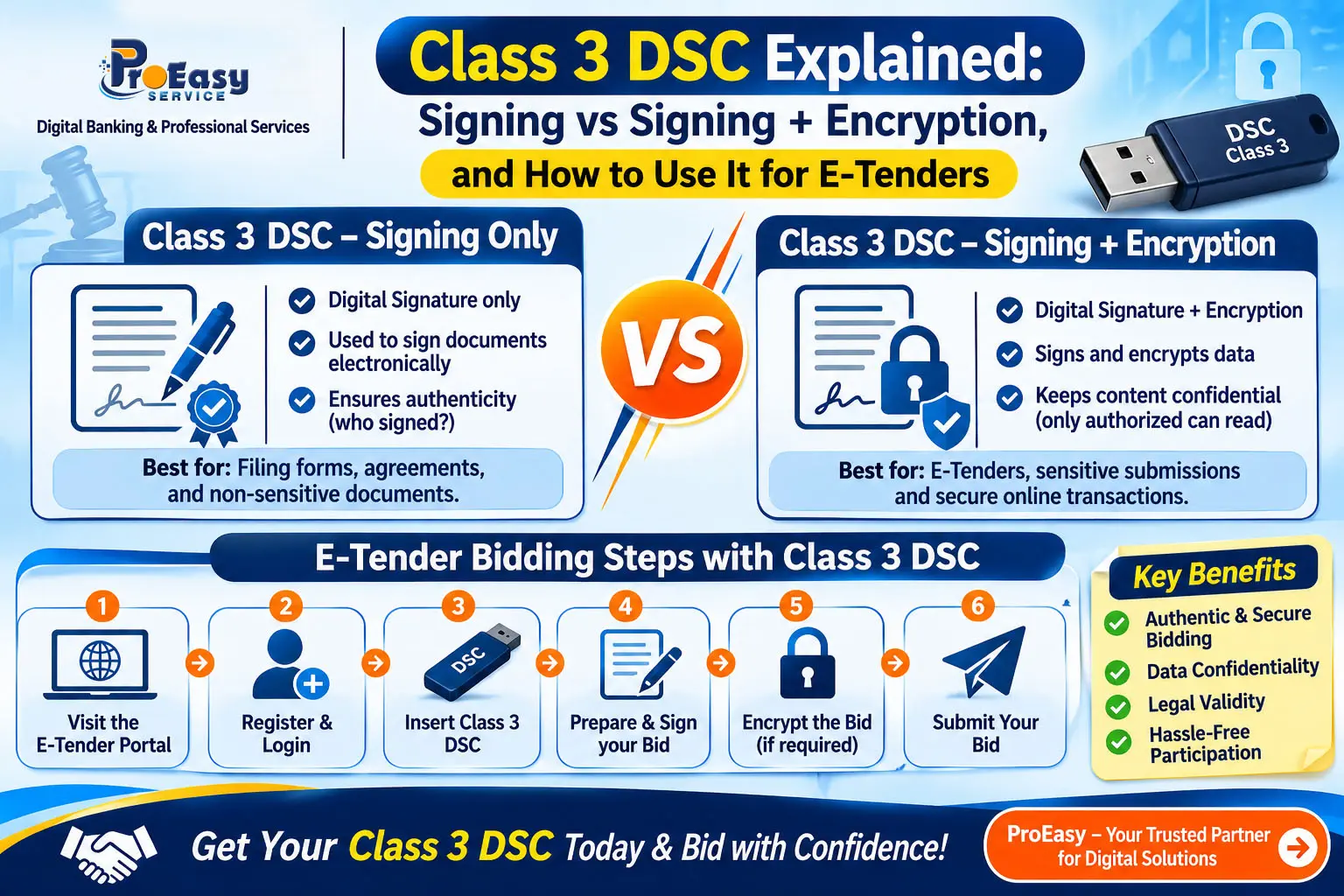
Class III Signing vs Signing + Encryption

Signing only: Proves your identity and that the document is genuine. This is enough for most filings, such as GST returns, income tax and MCA.

Signing + Encryption: Adds a second certificate that scrambles your documents so only the right authority can open them. Many e-tender portals ask for it, especially for the sealed financial bid.

Easy rule: If you will bid on tenders, take Signing + Encryption. If you only do filings, Signing is enough. When in doubt, check the tender notice or portal instructions before buying.

Where do you use a DSC?

  • ✅ E-tenders and e-procurement portals
  • ✅ GST registration and returns (mandatory for companies and LLPs)
  • ✅ Company filings on the MCA portal
  • ✅ Income tax e-filing and audit reports
  • ✅ DGFT and import-export work
  • ✅ Trademark and other online applications
  • ✅ Signing contracts and PDFs

How to bid in e-tenders with a DSC

  1. Get the right DSC. Class 3 Signing + Encryption, on a USB token. Check your tender notice first.
  2. Register on the tender portal. Create your bidder account, such as on a state e-procurement portal, CPPP or GeM.
  3. Map your DSC. Link both your signing and encryption certificates to your login. This is the step most bidders get wrong.
  4. Keep your documents ready. PAN, GST, experience proof, financial documents, EMD details and company papers, as the tender requires.
  5. Download the tender and fill in the bid. Upload documents in the format the portal asks for.
  6. Sign and encrypt your bid. The portal will ask you to plug in your token and enter your password (PIN).
  7. Submit before the deadline. Don’t wait for the last hour, because portals slow down near closing time.
  8. Save your receipt. Keep the acknowledgement as proof of submission.

Pro tips: Test your token on the portal a few days early, use the browser and Java/driver settings the portal recommends, and never share your token PIN.

How to renew your DSC

DSCs are valid for 1, 2 or 3 years.

  • Renew before expiry. Don’t wait for the last day. Many portals reject expired DSCs, and your bid or filing can fail.
  • Renewal needs fresh identity verification, usually online KYC with your documents. Cloud-based and video-verified options are available from many providers, but check what your target portal accepts.
  • After renewal, re-map the new DSC on every portal where you used the old one, such as tender portals, GST or MCA.

Reminder: Set a calendar reminder 30 days before expiry.

Common mistakes to avoid

  • Buying a Signing-only DSC when the tender needs encryption
  • Forgetting to map the DSC on the tender portal
  • Letting the DSC expire right before a tender deadline
  • Sharing your token or PIN with others
  • Buying from an unlicensed provider, since portals can reject it
  • Losing the token with no backup plan

Get your DSC the easy way with ProEasy

At ProEasy Service, you can order your DSC online without running around:

  • Choose Class 3 Signing, Signing + Encryption or DGFT
  • Choose Individual or Organisation
  • See the price before you pay
  • Share your documents online and track your order
  • Get support from real people

👉 Order your DSC on ProEasy Service

Quick FAQ

Is Class 2 DSC still available?
No. Only Class 3 is issued now.

Which DSC is needed for e-tenders?
Usually Class 3 Signing + Encryption. Always check the tender notice.

How long is a DSC valid?
1, 2 or 3 years, depending on the plan you choose.

What if my DSC expires?
Apply for a new one with fresh KYC, and re-map it on your portals.

Can I use the same DSC for GST, MCA and tenders?
A signing DSC works for many filings, but tenders may need a Signing + Encryption DSC. Portals can have their own rules, so check before you buy.

Need help choosing or mapping your DSC? Call the ProEasy team at +91 9337075353. We are happy to guide you.
Tags: DSC Digital Signature Class 3 DSC
Share:
Search
Category
  • GST & Tax (GST + ITR) (2)
  • Business Registration & Certification (registration + ISO, PSARA, trademark) (3)
  • Payroll & Compliance (EPF/ESIC) (1)
  • Digital Signature (DSC) (1)
  • Insurance (0)
  • Digital Payments & Partner Growth (1)
  • Website, Branding & Marketing (0)
Related Posts
  • image
    21 Nov, 2026
    ISO, PSARA & Trademark: The Complete Guide to Business Certifications and Licences in India
  • image
    21 Nov, 2026
    EPF & ESIC Compliance Made Easy: The Complete Employer Guide (Registration, Monthly Returns & Penalties)
  • image
    20 Nov, 2026
    How to Start a Digital Payment Service Point in India: A Simple Step-by-Step Guide (2026)
Tags
ISO Certification PSARA Licence Trademark Registration Business Licences Compliance ISO 9001 Security Agency Brand Protection For Small Business B2B Services Licence Process Tender Eligibility EPF ESIC Payroll Labour Law Employer Compliance EPF Registration ESIC Registration ECR Filing Monthly Returns Penalties & Interest Due Dates For Employers Digital Payments AePS Service Point Digital Banking UPI Cash Withdrawal Bill Payment Money Transfer Biometric Device Small Business Ideas Retailer Income Business Correspondent CSC Fintech Rural Banking Recharge Services ProEasy Payment Partner Growth Retailer Tips DSC Digital Signature Class 3 DSC Signing Certificate Encryption Certificate E-Tender DSC Renewal DGFT DSC E-Procurement GeM GST Filing MCA Filing Government Tenders USB Token Online Signing DSC Services Compliance Services Business Services ProEasy Proprietorship Private Limited Company Business Registration Company Registration Business Structure Startup India MSME Udyam Registration Small Business New Business Entrepreneurs Business Tips Limited Liability Business Loan GST Registration Startup business registration proprietorship partnership private gst itr tax service tips proeasy
shape
shape
shape
shape
shodow
image

We work with retailers, agents, consultants, CSC and service centres who need dependable back-end support to serve their own customers. From GST and income tax filing to company registration, DSC, EPF and ESI, banking services, website and app development and digital marketing.

Our Services

  • GST Registration
  • ISO Certification
  • Digital Payments
  • Mobile App Development
  • MSME Certificate

Quick Link

  • About Us
  • Our Services
  • FAQ
  • Support
  • Our Blogs

Contact Us

Plot No. 1174, Near Soubhagya Nagar Gate, Bhubaneswar, Odisha 751003

  • Opening Hours:

    Mon - Sun: 10.00 AM - 07.00 PM

  • Phone Call:

    +91 9337075353

© All Copyright 2026 by Proeasy Service

  • Terms & Conditions
  • Privacy Policy